Jobs are the heartbeat of DECTRIS CLOUD. They allow you to deploy ready-to-use scientific workflows or build custom routines while automatically maintaining a rigorous record of every analysis step. In the world of high-throughput data, this provenance is what transforms a simple plot into a defensible scientific result.
We are constantly refining the platform to make jobs more intuitive and powerful. Our latest updates focus on lowering the barrier for custom scripting, enhancing how you view job outputs, and streamlining how you share results with your team.
Below is a look at the features we have rolled out to make your analysis more efficient.
Run your Python Script as a Native Job
Job Templates on DECTRIS CLOUD were originally based on Bash scripting. It is now possible to script purely in Python, significantly lowering the barrier for creating custom scientific workflows. (Bash remains fully supported for those who prefer it).
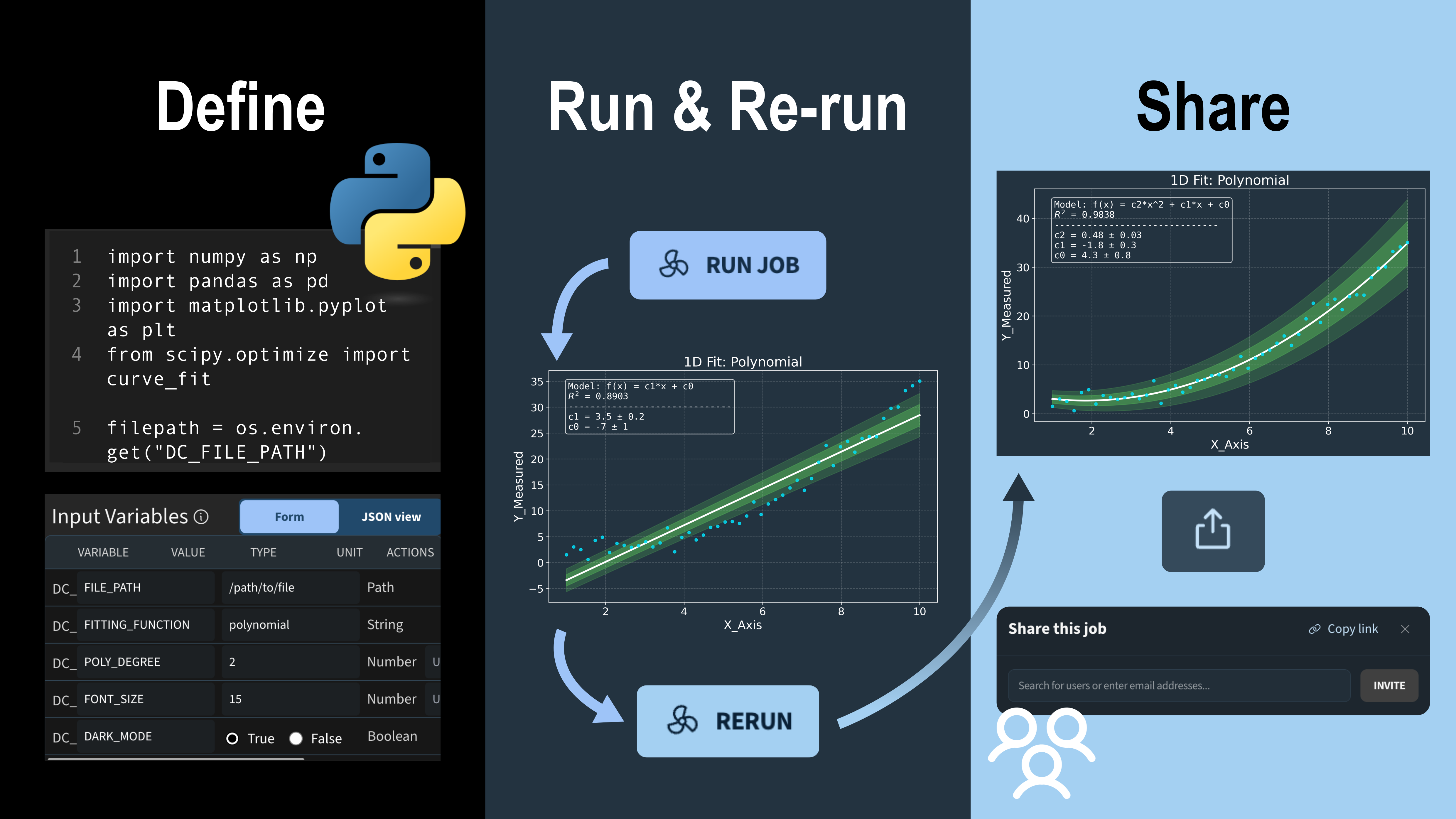
A practical example is the 1D Data Fitting template from our public repository. To implement a Python job, you simply choose an environment where Python and your required packages (like numpy or scipy) are installed. From there, it is familiar Python scripting.
Video: Depiction of a Python job on DECTRIS CLOUD being configured, including updating descriptions and classifications of input parameters.
The input variables are defined as part of the job template and can be re-configured by other users when launching the job. In the Python template, these are imported as environment variables, for example: filepath = os.environ.get("DC_FILE_PATH", "")
To provide more clarity, we’ve added a new feature: input parameters can now include a description and physical units. This is especially helpful for ensuring accuracy when sharing workflows with collaborators or returning to an old project months later.
In the example template above, the user defines the path to an input file and can specify the fitting model, the polynomial degree, and plot styling options like font size. The fitting itself is performed using the scipy.optimize package. An example of the resulting output can be seen below:
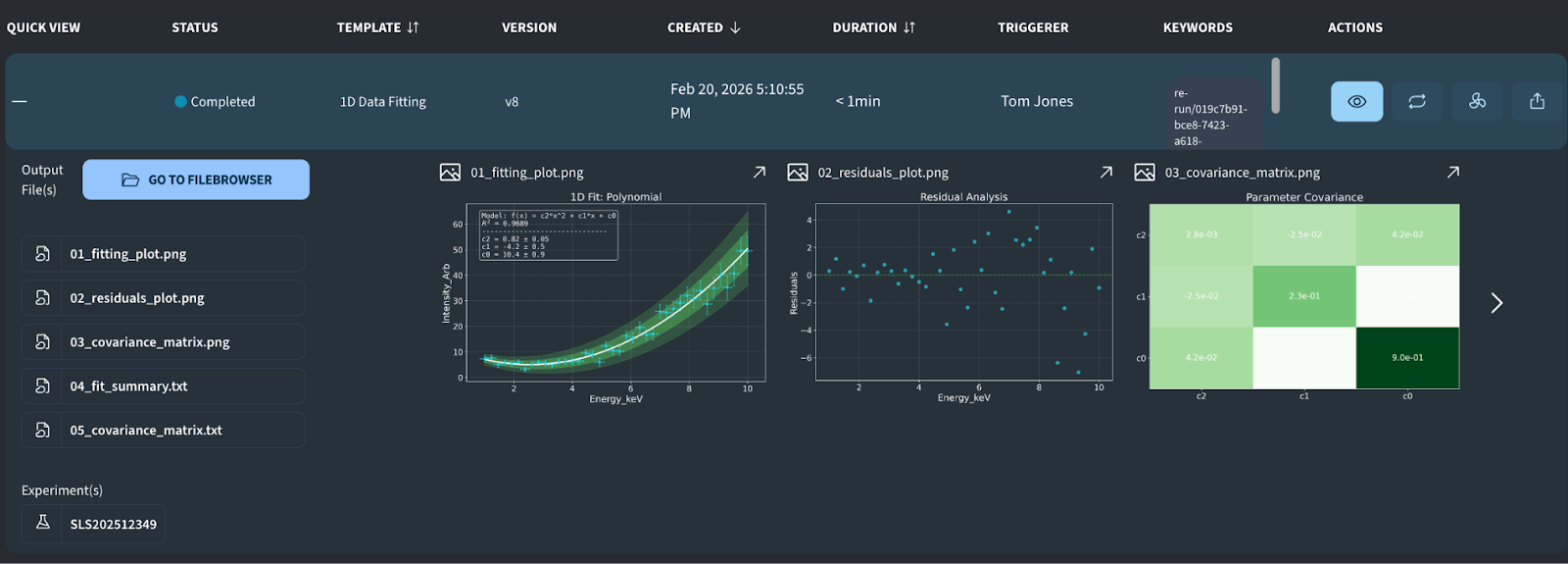
Image: Example output from the “1D Data Fitting” job, featuring a scatter plot with the fitted line, a residuals analysis, and a covariance matrix heatmap.
Simple Job Submission and Collaborative Reruns
The workflow for running a job has been completely refactored. To improve clarity and reduce configuration errors, the process is now spread across three steps:
- Step 1: Select the data path.
- Step 2: Configure scientific input parameters.
- Step 3: Select machine performance type and disk space.
Video: Walkthrough of the updated process for running a job for the first time on DECTRIS CLOUD
In addition, jobs can now be conveniently re-run directly from the job output table. As soon as a job entry appears, you can launch a new run by clicking the Rerun button. The system supports two modes:
- Single-click Rerun: Repeat the job with the exact same parameters. This option is ideal for verifying results or collecting additional statistics.
- Adjusted Rerun: Modify specific input parameters before launching. This is particularly useful for optimizing job performance or performing hyper-parameter scans.
Video: Re-running a job with modified parameters
To facilitate teamwork, every submitted job appears in the job table of all project collaborators. If a job utilizes data from a shared project, everyone on that team can view the output, regardless of who originally triggered the analysis.
Collaborators with access to the same analysis tools can also re-run each other's jobs. This makes it easy to iterate on a colleague’s work and maintain a clear history of how different input parameters affect the final scientific result.
More Insights from the Job Details Page
While expanding a job entry in the table still provides a quick summary, we have introduced a dedicated Job Details Page for deeper inspection. By clicking the eye symbol, you are taken to a full-page view designed to help you navigate complex results, particularly when a job generates a large volume of files.
To keep your analysis organized, the details page is now organized into several functional tabs, including:
- Output: A centralized view to browse and inspect all generated data and visualizations.
- Input: A permanent record of the exact parameters and configurations used for that specific run.
- Log: Access to the full job log, including everything written to stdout, making it easy to troubleshoot or verify the execution steps.
Video: Viewing the job details page
Shareable Results and Full Analysis Provenance
Jobs are not just useful for iterating on parameters and keeping a history of your analysis. Once you have reached your final result, you have full provenance of the analysis performed to reach the result. This includes the job template (the script), the software environment (the stack), and the specific input parameters used. Each of these components is assigned a permanent, unique identifier, ensuring you can always trace exactly how a result was generated.
To make communication easier, we have introduced a new Share Link feature. You can now share a specific Job ID beyond your project collaborators. This allows you to send results directly to your PI, a colleague, or an external reviewer for feedback without requiring them to create a DECTRIS CLOUD account.
Video: Sharing a job result with another user on DECTRIS CLOUD, as well as via link
The long-term vision for DECTRIS CLOUD is to simplify how you track, defend, and revisit your research. By maintaining a clear paper trail, the platform makes it effortless to justify your conclusions if someone questions your methodology. Whether you need to re-run a script years later or make a quick figure adjustment based on reviewer feedback, the system ensures your analysis remains accessible and fully reproducible.
![Transition from raw detector images to electron density maps and refined atomic models in Coot. Depicted data is from the 7QNP dataset [14]. The 3D molecule rendering has been produced with the Render Molecule job template, which utilizes the MolecularNodes Blender plugin developed by Brady Johnston.](https://cdn.prod.website-files.com/670f957a3be26367c038245d/69c698806079c5f5265daa1a_thumbnail_v3%20(1).png)